
Google Business Profile Optimization for Landscapers
Here’s a scenario that plays out every single day in your city:
A homeowner sees their overgrown yard and pulls out their phone to Google “landscapers near me.”
Three business profiles pop up at the top of the local search results, and they call the first one. Everyone else trailing behind? They might as well not exist.
Let me show you exactly how to set up and optimize your Google Business Profile so you’re the first to get those calls.
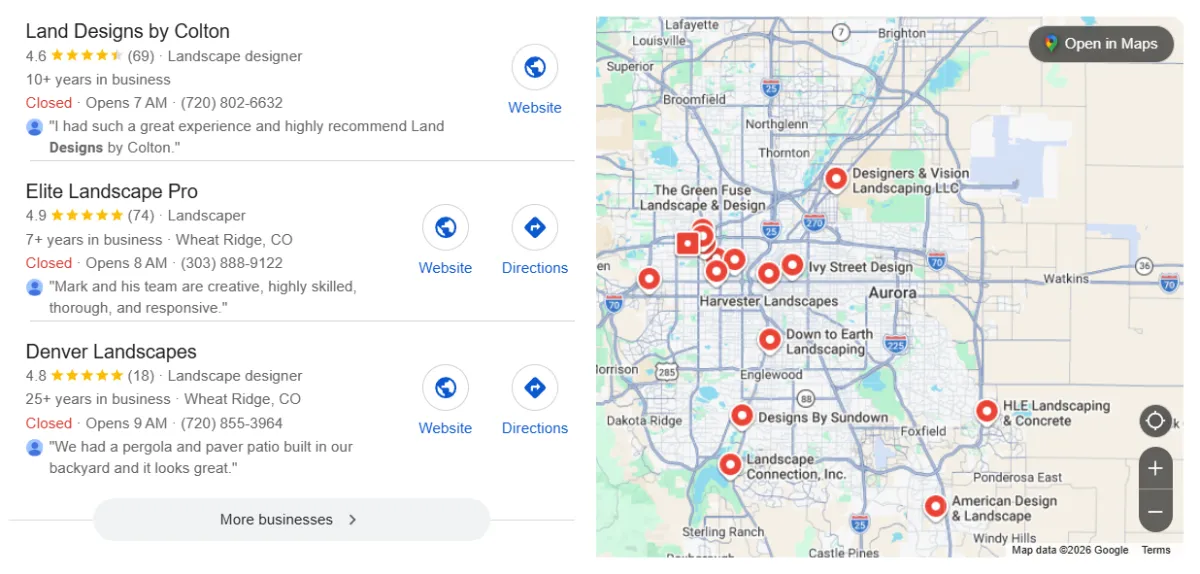
What is a Google Business Profile (GBP)?
Your Google Business Profile controls everything about how your landscaping business shows up when people search. Your phone number, service area, customer reviews, photos, and business hours… all of it lives here.
When someone searches for “landscaper”, Google looks at every landscaping company in their local market and decides who to show on the first page results based on their business profile.
Better optimization = you show up higher = you get more calls from potential clients.
There are three main things Google cares about when deciding local search rankings:
1. Relevance
If someone searches “irrigation repair”, Google will check your business profile to see if you actually do irrigation work. If your primary category and business description make it clear you handle irrigation, you’ve got a shot at showing up. If not, you’re out.
This is why filling out every single field in your profile matters for local search engine optimization. The more business information Google has about what landscaping services you offer, the better it can match you to the right local searches.
2. Distance
Google prioritizes businesses near the searcher’s area. A company 40 miles away won’t show up higher than a local business.
This is exactly why you need to list out every single service area you cover. Work in Scottsdale, Tempe, and Phoenix? List all three.
3. Prominence
This is Google’s way of measuring how well-known and trusted your landscaping business is.
How many positive reviews do you have from satisfied customers? What’s your rating? Do other websites and contractor directories mention your business? Are you getting more website traffic?
All of this tells Google whether you’re a legitimate, established landscaping contractor in your local market.
Ready to turn your happy customers into your best marketers? Read our ultimate guide on how to get 5-star contractor reviews.
How to Optimize Your Landscaping Business on Google Maps
Before we start, you need to list your business on Google.
Google can sometimes create one for you. You can search for your business name to see if you already have an existing listing. If you can’t find anything, follow our guide to create a Google Business Profile.
Once your profile is ready, start optimizing it by following these five steps for effective Google Maps SEO.
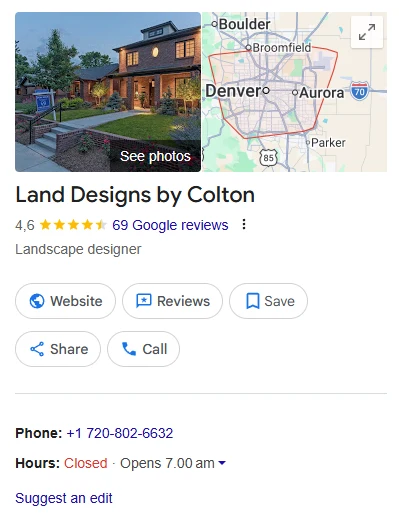
Step 1: Pick the Right Primary Category
Picking your primary category matters more than you might think.
You’ve got options like “Landscaper,” “Landscape Designer,” and “Lawn Care Service.” Pick the one that best matches where most of your revenue comes from. For example, if it’s landscape design and installation, go with “Landscape Designer.”
Then you can add secondary categories for everything else you do. Hardscaping, irrigation, tree work, lighting, whatever applies.
Don’t add categories for services you don’t offer just to show up in more searches. Google’s algorithm will figure it out eventually, and it’ll hurt your online visibility.
Step 2: Fill Out Every Single Detail
Now, let’s go over how you should fill out every detail to make your landscaping business profile stand out.
This is where you sell your landscaping business in under 750 characters, so make it count.
Write a business profile description that’s actually useful. It should tell your potential customers who you are, what you do, and where you are serving.
Google lets you add up to 20 service areas. If you work in 8 cities, list all 8. If you work in 25, list the 20 most important.
It also wants specific cities and zip codes so it can show you more local customers in each area.
For example, if you service Winter Springs, Casselberry, Longwood, and Sanford, FL, list them all. So when someone in Sanford searches for landscaping help, Google knows to show your landscaping business.
Getting your service areas right is just one piece of local SEO. For the complete strategy on dominating local search, check out our full guide on SEO for landscapers.
Put in your real operating hours. Some landscapers list 8 am-5 pm Monday through Friday, but they never answer their phone because they’re on job sites all day. This can hurt your reputation.
If you’re not answering calls during certain hours, don’t list those as your hours.
Your phone number and contact details must exactly match what’s on your website. Google cross-checks this.
For your website, include a direct link to your site. And that website better work well on mobile devices. If your site loads slowly or looks bad on mobile, your leads are hitting the back button and calling your competitor.
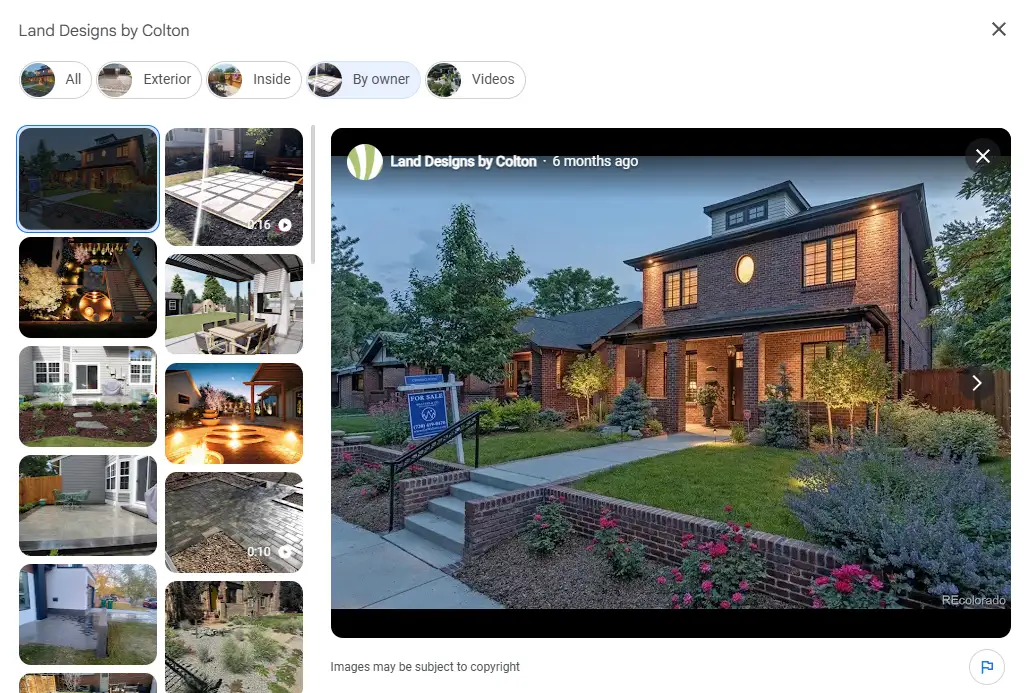
Businesses with lots of current, high-quality images absolutely crush businesses with 5 old photos from 2019.
Every week or two, throw up 3-5 new shots from recent jobs. This keeps your profile fresh and signals to Google that you’re an active landscaping business.
Here’s what to upload:
- Your logo: Clean, simple, recognizable across all your online marketing.
- A cover photo: One that makes people stop scrolling and think, "damn, I want my yard to look like that."
- Before-and-after shots: Show the lifeless yard you started with and the beautiful finished product.
- Ongoing projects: Show the progress, not just the results.
- Your crew and equipment: Put faces to your business, telling Google you're a real, established business in the local community.
Step 3: Actually Maintain Your Profile
Your business profile isn’t a “set it and forget it” thing. Stuff changes, and you need to keep your business information current to maintain your local visibility.
It can hurt your rankings if Google gets confused by inconsistent information. Keep your info consistent and up to date everywhere:
- your mobile-friendly website
- your Facebook
- any local directories you're listed in
Step 4: Get Verified (And Why This Actually Matters)
The verification process is Google’s way of confirming you’re the real business owner.
Usually, Google mails you a postcard with a verification code to your business address. Sometimes, they’ll verify by phone or text instead.
Until you verify, your business profile is limited. You can’t fully manage it, respond to reviews, or make updates. If you’re serious about optimizing your Google Business Profile, this step is not optional.
Step 5: Go Beyond the Basics (This is Where You Beat Everyone)
In 2026, reviews are among the most important local search ranking factors. Getting reviews must be part of your routine after every job.
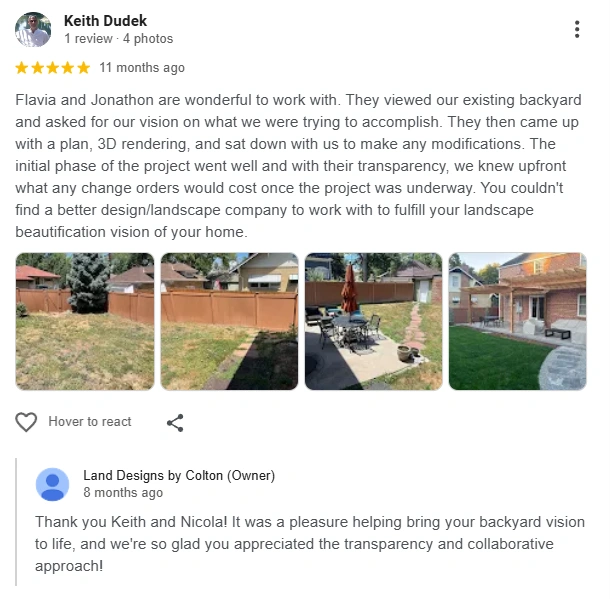
But here’s what many landscapers miss: responding to reviews is just as important as getting them.
So, respond to every positive review: “Thanks, John! Really enjoyed working on your backyard. Glad you’re happy with how the patio turned out.” Simple, personal, genuine.
Every negative review gets an even more important response. This is your chance to show everyone how you handle problems. Stay calm, acknowledge what went wrong, apologize if you need to, and offer to make it right.
Google Posts are basically little updates that stay live for a week. You can post about:
- Seasonal deals
- Jobs you just finished with before and after shots
- Seasonal tips
- New landscaping services you're offering
- Awards, certifications, and any credentials worth mentioning
These posts can include direct link pages on your website. You can drive more website traffic to individual web pages without extra work.
If you’re already creating social media posts for your landscaping company, you can repurpose that content here, too.
This is a feature that very few landscapers use, so it’s a great way to stay ahead of the competition. Post once a week or every two weeks if you can. The point is consistency to maintain your online visibility.
3 Mistakes That'll Kill Your Rankings
Let me save you from the mistakes I see landscapers make all the time that hurt their local SEO rankings.
1. Stuffing Keywords Into Your Business Name
If your business is called “Desert Oasis Landscaping,” then that’s exactly what should be in the business name field.
Don’t put “Desert Oasis Landscaping | Best Lawn Care Service Irrigation Hardscaping Phoenix AZ” thinking it’ll help you rank better. That’s keyword stuffing, and Google can suspend your profile for it.
2. Picking Random Categories You Don't Actually Do
Only add categories for landscaping services you genuinely provide. If a potential customer calls you asking to get their lawn mowed when you don’t actually do that, that only hurts your credibility.
You want to rank for the services you actually provide. Quality over quantity attracts the right customers.
3. Ignoring Reviews Completely
Not responding to reviews won’t tank your local search rankings overnight. But it’s a huge missed opportunity to connect with potential clients.
When people are comparing you to competitors, they’re reading reviews. If you have 50 reviews and you don’t reply to any of them, it makes you look bad. Especially when compared to a competitor with only 30 reviews, but responds to every single one.
Responding shows you’re engaged, you appreciate good customers, and you handle problems professionally.
Everything Works Better When It's Connected
Your Google Business Profile shouldn’t exist in isolation. It needs to be a part of a larger landscaping SEO strategy, connected to all marketing work on your website, social media, and other online platforms.
Location-Specific Service Pages

- "Landscaping Services in Denver"
- "Arvada Landscape Design and Installation"
Each page talks specifically about working in that city, shows completed projects from that area with high-quality images, and makes it crystal clear that you actively serve there.
Then you can link to these location-specific service pages from your Google Posts and business profile with a direct link.
This creates a strong connection between your profile and website that Google notices, improving both your local SEO rankings and organic search performance.
Use Social Media Without Overthinking It
You don’t need to post on social media three times a day. But when you finish a project, take high-quality photos and post them on Instagram, Facebook, your Google Business Profile, everywhere.
This multi-channel presence helps more customers find you and reinforces that you’re an active, legitimate landscaping business in your local market.
Final Thoughts on Dominating Local Search
What gets you to that top spot isn’t your work quality, prices, or even how long you’ve been in business. It’s whether you’ve taken the time to properly optimize your Google Business Profile.
We’ve optimized Google Business Profile listings for landscaping companies across the country. We know exactly what works because we’ve tested it hundreds of times.
More importantly, we don’t just optimize your Google Business. We connect it to a comprehensive local SEO strategy, all working together to help you dominate your local market.
Interested in making your Google Business Profile show up higher and making your phone ring? Let’s talk.